Joe Maller.com

At some point, I need to stop writing drafts and actually publish something here.

Share |

link: Dec 03, 2009 1:47 pm
posted in: misc.

9/11/2009

The night of September 10th I went for a run, instead of my usual route, I ran downtown to Ground Zero. Amid the street closings, barricades and police, an overnight fire crew was walking slowly up Church Street with a large wreath. My eyes filled with tears and I could do nothing except kept going.

The fire station across 14th Street from our apartment, Engine 5, gathers on the sidewalk in front of the station for four moments of silence each year. I would imagine most stations do the same.

8:46am is always the hardest. That’s when everything floods back. Each of the following moments gets a little easier, but this is when the memories of images and smells and feelings are nearly overwhelming.

9:03am was the moment we knew Flight 11 was no accident, but that distinction and those 17 minutes of residual innocence have been lost to time.

At 9:59 the South Tower fell and one of the city’s mountains vanished, we knew things would never, ever be like they were.

By 10:28, many of the emotions have washed out, grief and awe give way to genuine feelings of thanks and respect.

Previous 9/11s: 2001, 2002, 2003, 2004, 2005, 2006, 2007, 2008.

Share |

link: Sep 11, 2009 9:52 pm
posted in: misc.
Tags: ,

Worst component ever

SunFone's hissing ACU057A-0512

Pretty much every one of these I’ve owned has failed.

Almost all of my failed power supplies were connected to one of our otherwise awesome Other World Computing Mercury Elite-AL enclosures. Generally, the power adapters last about a year, then go hissy and fail. All of them have been plugged into power conditioning UPSes.

The model number is ACU057A-512. They’re manufactured by SunFone who also supply power adapters for LaCie. These fail so dependably, I’ve taken to keeping spares on hand to make sure I can keep our server’s backup drives online.

Lacie has a photo identifying their power adapters (original). I have a few very old versions of these which explicitly list SunFone as the manufacturer — amazingly they’re still working.

If you’re lucky, the power supply will just fail and the drive will no longer mount. If you’re unlucky, the power supply will gradually fail and some data on the drive will be corrupted. Often the drives will be heard faintly clicking, and if they mount at all, they’ll report all sorts of errors. After at least 8-10 failures, I can only remember one instance where data was compromised. Thankfully that drive was part of a redundant backup strategy, so nothing was lost.

When these fail, they emit a hissing sound. Sometimes it can be heard from across a noisy room, other times I had to hold the brick up to my ear. Sounds like this:

Bob Friesenhahn’s report on MacFixit also mirrors my experience.

I have four D-series LaCie drives here. All of them have experienced power failure. In fact, in the past couple of years I have replaced six failed power supplies. The power supply model number is ACU057A-0512.

The failed supplies were all plugged into a high grade UPS and see an average temperature of 75 degrees. Average time to fail seems to be six months. No supply has lasted more than one year.

Now I purchase these supplies in bulk and keep three of them on hand at all times.

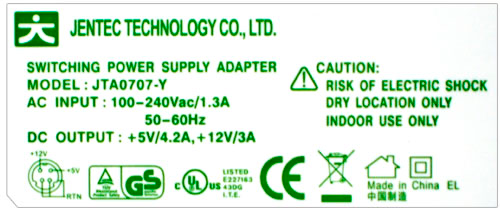
As of September 2009, it looks like OWC has finally switched to a completely different power adapter. Also, a their replacement part number for the doomed SunFone adapters now shows Jentec model JTA0707-Y. OWC has been really good to me over the years, so I’m hoping this change will be the end of this story.

Update January 2011: All of the replacement Jentec power supplies have been working smoothly for over a year.


NYTimes search bubbles begone!

nytimes-search-balloons-1

Those little search bubbles that popup on the New York Times website whenever you select text really annoy me. Clicking this bookmarklet on any NYTimes page will prevent them from appearing:

NYTfix

This is a 2-minute solution, there’s no domain checking or anything, all it does is remove existing bubbles then cancel the document’s mouseup observer, which the NYTimes site uses to trigger the search balloons. The bookmarklet was very quickly checked in Safari, Firefox and IE8, NYTimes text selection doesn’t work at all for me in IE6 or IE7.


WWDC 2009 Predictions

There’s been a lot of stuff going on in my life this year, and I haven’t had much time to prepare for WWDC or even really to think about it before getting here. But I’ve posted my predictions for the past handful of years so I jotted some thoughts down on the plane. I haven’t been keeping up with the rumors, so these are quite literaly pulled out of thin air. This is last minute again, I’m posting this from the keynote line. I’ll update with right/wrong and clean up typos after the show.

Snow Leopard

Apple will claim they lied last year they said Snow Leopard would have “no new features.” They’ll probably position it as “this was just too cool not to put in.” What we’ll see will be a radical rethinking of elements of the OS X Interface. The team who built the iPhone UI will have been brought back to the OS group to work their magic on Mac OS. The features may not be ready yet and might not be included in the developer build, but it will be demoed and highly publicized. (just don’t call it leopard skin) Possible strategies include something like “the iPhone was built with the best of Mac OS X, now we’re bringing the best of iPhone back to the Mac.” [wrong, but probably just too early]

The total re-thinking of the window menu bar in the Safari beta and elements of the iLife interface (hopefully the less infuriating subset) will prove to have been a hint of what’s coming. Aside from revamping the appearance and function of interface windows, I expect some sort of real-time text suggestion/correction system similar to the iPhone’s inline typing corrections.

We still won’t get true resolution independence. I really want to run at AppleDisplayScaleFactor 0.8, but it doing so breaks all sorts of little things around the system. [seems right, but we’ll see]

Hardware

New iPhones will be announced and demoed, but they won’t be available for a month or two. A lot of iPhone 3.0 is known already, but one thing we might see is some sort of demonstration where the iPhone becoming an auxiliary input and display device for nearby macs. Sort of like Remote but more functional. [right on iPhones] [wrong on timing]

I’m doubtful about any new hardware, though I wouldn’t be surprised to see a small upgrade to portables coupled with a simplified portable product line. The distinction between MacBook and MacBook Pro has gotten really fuzzy. [right on new iPhones]

Portables will also be acquiring location-awareness through a basic GPS chip. If they don’t, I’ll just repeat this one for the next Apple product announcement and for every subsequent announcement until it comes true. It is insane that any portable computing device doesn’t know where it is. [still wrong, so I’ll be trotting this out again next time]

No tablets or Netbooks. Though everyone will be talking in hushed whispers about their hackintoshes. [right, too easy]

I’d be terrified to bring a hacked-Mac netbook to WWDC, but someone, possibly quite a few, will. I have to leave the conference early this year to attend a wedding, I will be starting a rumor that Apple saw my hacBook and threw me out of Moscone for running Mac OS X on non-apple hardware. [right. I saw many netbooks, though only one guy dumb ballsy enough to run Mac OS X on his]

Jobs is the elephant in the room. Everyone seems to expect some sort of appearance. I don’t think he’ll be here, but if he does appear it will be either via video iChat or there will be a video letter/statement. Either one of those will be an unintentionally hilarious recreation of the 1984 Apple ad. [too much waffling on my part to call this either way]


Fixing mixed-encoding MySQL dumpfiles with WordPress

Early versions of WordPress didn’t specify database encoding. Databases created with those earlier versions usually defaulted to Latin1 (ISO-8859-1) character encoding. Problem was, WordPress around version 2.2 started setting new databases to use UTF8 encoding. This is a good thing, except existing databases weren’t migrated. Unfortunately, WordPress from that point forward assumed all databases were UTF8 and inserted UTF8 data into Latin1 tables.

It’s likely none of this would be a problem unless attempting to export and restore a database. Well, that’s not entirely true. Since encoding will garble inside the export/import loop, a lot of WordPress sites can not be backed up properly. There are no errors, no warnings, just sites littered with wrongly encoded entities (Mojibake) after restoring or moving to a new server. This also means that any existing database backups are probably useless.

None of the solutions I found worked for me. Arriving at a functional solution took forever. Troubleshooting multi-stage character encoding problems is a thankless, maddening task.

Dumping the database and moving to UTF-8

Dump the current database:

mysqldump --opt --default-character-set=latin1 --skip-extended-insert myDB -r myDB-latin1.sql
  • -r tells mysqldump to write directly to the output file. I’ve read that using Unix redirection carets could sometimes result in encoding corruption. Native output supposedly gets around that issue, although the notes on this MySQL bug say otherwise.
  • --skip-extended-insert puts each row of data on it’s own line. This makes it easier to diff the resulting files or open them in a text editor like TextWrangler without exceeding horizontal character limits.
  • --default-character-set=latin1 tells mysqldump not to do any conversion of the table’s contents since it believes they’re already Latin1. Matching the existing character set prevents MySQL from trying to convert any data. Since WordPress was already stuffing UTF-8 data into Latin1 tables, we need to dump this without any conversion.

Carefully review the dumpfile for encoding errors. I’m sick thinking about how many of my early attempts might have worked, except the initial file was corrupt.

No really, you’re UTF-8

The dumpfile will have no encoding information, so I used iconv to convert it to UTF-8. Note that there may be a few characters which cannot be translated and will throw errors. Save yourself some grief and find an iconv binary which offers the -c flag to ignore those errors:

-c    When this option is given, characters that cannot  be  converted are  silently  discarded, instead of leading to a conversion error.

Most of the webservers I checked had the same 8 year old version of iconv which doesn’t have the -c flag, so I scp’d the file to my local machine. MacOS X has a recent enough version of iconv to use for the conversion.

iconv -f UTF-8 -t UTF-8 -c myDB-latin1.sql > myDB-utf8.sql

It’s worth trying a conversion without the -c flag, to see if it will work. If it doesn’t, the -c flag will drop the problem characters. I didn’t find an acceptable automated workaround for this so I just diffed the files and hand-inserted the missing characters. I only had four to replace and none of them were textual.

After many failures and frustrations, I found myself checking file differences all the time. While seeing them is easy in TextWrangler, I checked plenty on the server too:

 diff myDB-latin1.sql myDB-utf8.sql

A few � characters slipped through here, though these might have been already converted errors from previous database migrations that were never noticed. I used TextWrangler to replace them with a small comment token which I will find and replace in context later on. I didn’t have any luck trying to make that replacement with sed.

Fixing the dumpfile

Before running a global replace on all your data, grep for ‘latin1’ first, to be sure the string doesn’t appear anywhere in your dump file other than structural commands. This is an example of a safe dataset:


$ grep latin1 dumpfile
/*!40101 SET NAMES latin1 */;
) ENGINE=MyISAM DEFAULT CHARSET=latin1;

If your data has a ‘latin1’ somewhere in it, either edit the dumpfile by hand or read this and dump your schema separate from your data. My data was clean so I just used Sed to replace the latin1’s with utf8’s:

sed -e's/latin1/utf8/g' myDB-utf8.sql > myDB-utf8-fixed.sql

Prepping MySQL

There are several places where MySQL might re-interpret text encoding, these all need to be dealt with.

The most important step is to create a completely new database for your cleaned data. Despite all the following settings, older databases may hang onto character encoding settings and cause problems in the future. Odds are if you’re dealing with this problem, your database was created prior to MySQL 4.1 adding Unicode support.

The database may need to be configured to use the correct character set and table collation methods.
Database settings don’t propagate to existing tables, but that won’t be an issue since we’re using a newly created database.

The client and database encoding settings can be checked in phpMyAdmin or by calling ‘status’ from the MySQL command line. The relevant lines are:


$ mysql myDB -e'status'
Server characterset:	latin1
Db     characterset:	latin1
Client characterset:	latin1
Conn.  characterset:	latin1

Invoking the MySQL command line client with a specified character set yields this:


$ mysql myDB -e'status' --default-character-setutf8
Server characterset:	latin1
Db     characterset:	latin1
Client characterset:	utf8
Conn.  characterset:	utf8

Change the database character set and collation settings with these commands:


ALTER DATABASE test CHARACTER SET utf8;
ALTER DATABASE test COLLATE utf8_unicode_ci;

Now MySQL status should show this:


$ mysql myDB -e'status' --default-character-setutf8
Server characterset:	latin1
Db     characterset:	utf8
Client characterset:	utf8
Conn.  characterset:	utf8

Unless you run the server, there’s likely nothing you can do about the server’s characterset encoding.

Updating WordPress

If you’re upgrading a WordPress installation that’s been around a while, be sure to update your wp-config.php file from the current config-sample. The most important two settings in there are these:


/** Database Charset to use in creating database tables. */
define('DB_CHARSET', 'utf8');

/** The Database Collate type. Don't change this if in doubt. */
define('DB_COLLATE', '');

Test and go

Besides local testing I also checked the dumpfile on a second database on the live server. If everything worked correctly, you should be able to roundtrip the data through MySQL and produce identical dumpfiles.

Remember to specify the default-character-set when you finally load the dumpfile back into the database:

mysql --default-character-set=utf8 DB < 

After this ordeal I doubt I'll ever invoke a MySQL command without explicitly setting the default character set again, but just in case, I've added this ~/.my.cnf file on all the systems I work with:


[client]
default-character-set=utf8

Double-check that's working by calling mysql --print-defaults and mysqldump --print-defaults to make sure the flags transferred.

This process was tested with the following MySQL distributions:

  • mysql Ver 14.7 Distrib 4.1.11, for pc-linux-gnu (i686)
  • mysql Ver 14.14 Distrib 5.1.34, for apple-darwin9.5.0 (i386) using readline 5.1
  • mysql Ver 14.12 Distrib 5.0.77, for unknown-linux-gnu (x86_64) using readline 5.1

Note: If you will be going between different MySQL server versions, you may need to use the --compatibility flag with an appropriate value. In my case, this site's production server (not under my control) is running 4.1.11 and my dev machine is running 5.1.34.

Other people who've dealt with this too

More on Unicode: The Absolute Minimum Every Software Developer Absolutely, Positively Must Know About Unicode and Character Sets (No Excuses!) - Joel on Software


iTunes Store DNS Connection Problems

Recently I’d been having some bizarre network problems, the most consistent of which was that I couldn’t connect to the iTunes Store. After a short round of testing, I was quickly able to determine that the problem was DNS servers I was using.

Yes, I’m one of those people who uses those 4.2.2.x DNS servers, for probably 10 years they’ve worked perfectly.

Methodology
While DNS servers can be set in the Mac’s System Preferences, that requires a lot of clicking and it’s faster to just use the networksetup command line tool. Since we’ll also be flushing the Directory Services cache with dscacheutil, switching servers can be condensed to one line making testing faster. Here’s an example of the command I’m using:

sudo networksetup -setdnsservers "AirPort" 4.2.2.1 && \
dscacheutil -flushcache

I repeated the above for each of the six known 4.2.2.x DNS servers. After individually setting each DNS server, I switched over to iTunes and attempted to access a different section of the iTunes Store.

Results
4.2.2.1, 4.2.2.2, 4.2.2.3, 4.2.2.4, 4.2.2.5 and 4.2.2.6 all failed to connect to iTunes. Each of the servers appeared to be online and responded to pings with an average response time of about 12 ms.

When I switched to any of the top three recommended DNS servers on DNSServerList.org, I was able to connect to the iTunes Store instantly.

There have been a few tweets with similar problems, but I couldn’t find anything related to upgrades or other problems with the 4.2.2.x servers. I haven’t yet been able to test this on other connections but will post an addendum once I have.

Share |

link: Mar 22, 2009 6:18 pm
posted in: misc.
Tags: , , ,


« Previous PageNext Page »