Joe's Filters: Joe's De-Interlacer
A better de-interlace plugin for Final Cut Pro. Faster, cleaner and more versatile.Visit the New FXScript Reference and Joe's Filters sites. These pages will be phased out soon and may already be out of date.
The Joe's De-Interlacer plugin is a part of Joe's Filters, shareware utility and image processing effects for Final Cut Pro.
What it does
Joe's De-Interlacer is twice as fast as Final Cut Pro's De-Interlace plugin.
I spent several weeks researching different methods of de-interlacing video, taking apart Final Cut Pro's de-intelace filter and looking for ways to improve the process. In the end, the speed of the resulting filter really surprised me, I didn't think it would be this fast.
In addition to the speed boost, this plugin also offers field doubling and a fading control, to combine the single-field image with the interlaced original.
What's wrong with Final Cut Pro's De-Interlace Filter
Final Cut Pro's de-Interlace filter is slow. More importantly it seems to have it's field's reversed. It's possible I'm wrong but here's why I think I'm not: NTSC DV's field dominance is Lower Field first (the opposite of most non-DV video formats). This means the meta-frame in the lower field is 1/60 of a second ahead of the second meta-frame in the upper field. A de-interlace filter isolating to the lower field should result in the earlier image in a frame. For example, if a car is quickly passing through an interlaced frame, the lower field should be slightly before the upper field, meaning the car will be further through the frame in the upper field. Final Cut Pro's De-Interlace filter does the opposite.
Example Images
 Original Image |
|
 Joe's De-interlacer: Lower |
|
 FCP De-interlace: Lower |
|


Notice how the FCP De-interlace filter seems to be moving the car backwards? This convinced me that the fields selected are not the fields they should be. The following images of a diver are all from the same video frame but the fields show a distinct difference in time:
 Raw interlaced frame showing both fields |
The diver is still completely in the air. Then 1/60 of a second later... |
Notice that the diver's hands have now broken the surface of the water. |


Other than field order, the two filters are nearly identical. To my eye, FCP's De-interlace result in a slightly darker image with more horizontal interpolation (fuzziness). Because Joe's De-Interlacer uses only the half-height field data instead of overwriting the opposite field, the resulting image may seem sharper.
Ultimately, the differences are very minor and the nearly 200% speed boost becomes the major advantage over the built in effect.
Other settings
Field-doubling is included mostly because it's possible, not because it's faster or looks better. Field-doubling turns off interpolation of the image and builds the full height image by repeating each horizontal row twice. Because each field is half the height of the total frame, this results in a full sized image.The resulting look is harder and more pixelated.
The opacity slider allows the de-interlaced image to be blended back into the interlaced original, this can reduce field artifacts without giving up all the resolution of the combined image. Fading the original back in yields results similar to Final Cut Pro 3's new Flicker Filter.
A similar but time consuming technique using multiple tracks and interim exported clips is discussed in Shawn Bockoven's Film Look article, Joe's De-Interlacer reduces that process down to a single filter. For an effect similar to Joel Peregrine's revised film-look process, see Joe's Field Blender.
The Controls
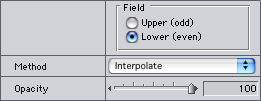
- Field
Chooses which field to use as the basis of the resulting image.
- Method (Interpolate, Field Double)
Determines the method of de-interlacing the video frame. Field doubling repeats each horizontal line twice resulting in a more pixelated image.
- Opacity
Fades the single-field image back onto the interlaced original.
A Note about De-Interlace Previews
De-interlace effects need to be rendered for an accurate preview. At zoom values below 100%, Final Cut Pro's desktop previews only show the lower field of interlaced video, pre-rendered effects use this scaled down, single-field image to preview before rendering.
Joe's Filters for Final Cut Pro
Joe's Filters
Joe's Filters Related
FXScript for Final Cut Pro
Joe's Debug and Explore Filters
Final Cut Pro tips
Film & Video
Recording the sound of
one eye blinking
Photography
Projects
Final Cut Pro
Design
WRITING
Site Notes Archive (weblog)
Web Resources
About Joe Maller
Past Home Pages Etc.
Search joemaller.com
Contact Me