Joe Maller: Joe's Filters: Joe's Noise
A Filter for Final Cut Pro which adds user-defined noise to images without adding a track.Visit the New FXScript Reference and Joe's Filters sites. These pages will be phased out soon and may already be out of date.
Joe's Noise is a part of Joe's Filters, a shareware package of utility and image processing tools for Final Cut Pro.
What it does
Joe's Noise adds random noise to an image without having to composite an extra track or nest the clips. The filter includes extensive controls for choosing colors to include in the noise mix, scaling the size of noise particles, pre-bluring the noise before applying and a full set of compositing controls for building the final image.
If you are curious about FXScripts and Final Cut Pro, I also wrote a page about the FXScript behind Joe's Noise...
Example Images
There are several options for controlling the noise that will mix into your image. Any of the different noise patterns can be blurred and mixed into the image using various blending modes. Large amounts of blur create a shimmering dirty look, something like a clouding effect. Below are examples of various noise patterns applied at 100%.
|


 Original Image |
|
|
|
|
 Amount: 50 Scale Noise: 300% Blur Noise: 0 Monochrome: yes (checked) Red, Green, Blue: 255, 255, 255 Mode: Normal Opacity: 100% |
|


Three Kinds of Noise
There are three different noise filters included with Joe's Filters bringing a wide range of noise filtering and adjusting options to Final Cut Pro. Each plugin's uses noise differently to produce unique results. Here are a few basic examples of the differences:
 Original Image |
 Joe's Noise Color |
 Joe's Noise Levels |
 Joe's Noise Saturation |
The Controls
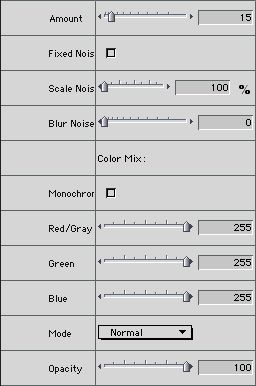
- Noise Amount (0.1 - 400)
Determines how much noise to add to an image.
- Fixed Noise
Determines whether the noise changes on every frame or stays fixed for the duration of the effect.
- Scale Noise (100 - 1000%)
- Blur Noise (0 - 10)
Blurs the noise before compositing it back into the image. A slight blur can prevent the noise from shimmering on a video monitor.
- Monochrome
Restricts colors to black and white. The RGB Color sliders have no effect when this is checked.
- Red/Gray, Green, Blue (0 - 255)
Controls how much of each color to mix into the noise. When monochrome is checked, the red slider controls the amount of gray.
- Mode, Opacity
Composite controls to specify how to apply the blurred image back onto the original.
Increases the size of the noise particles. colors to black and white. The RGB Color sliders have no effect when this is checked.
Joe's Filters for Final Cut Pro
Joe's Filters
Joe's Filters Related
FXScript for Final Cut Pro
Joe's Debug and Explore Filters
Final Cut Pro tips
Film & Video
Recording the sound of
one eye blinking
Photography
Projects
Final Cut Pro
Design
WRITING
Site Notes Archive (weblog)
Web Resources
About Joe Maller
Past Home Pages Etc.
Search joemaller.com
Contact Me